Friday, September 29, 2017
Tutorial 2 ELM Images File Selector and Popups
Tutorial 2 ELM Images File Selector and Popups
This is the second post in my series on developing GUI applications in Elementary using Python. Today we are going to continue building on the Hello Elementary example I started in the first tutorial. In todays post I will only be covering the code that is different from our previous examples, so if you havent looked that one over yet please take a moment to do so now.
You can find the full source code for all of todays examples here.
Example 3:
We are going to start off by displaying a static, pre-defined image in our GUI:
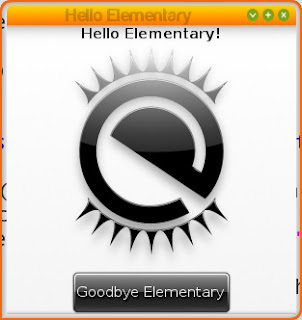
It only takes us 8 lines of actual code to create and display the above image in our program:
 #Creates an Image object that displays an image
 ic = elementary.Image(window)

 #Use the os module to get the current path to our .py file. Our image is relative to our .py We do this because it is best to use the absolute file path to images for the best results.
 location = os.path.dirname(os.path.abspath(__file__))

 #Tell our icon to auto-fill open space
 ic.size_hint_weight_set(evas.EVAS_HINT_EXPAND, evas.EVAS_HINT_EXPAND)
 ic.size_hint_align_set(evas.EVAS_HINT_FILL, evas.EVAS_HINT_FILL)

 #Here we set the image we want our icon to display
 ic.file_set("%s/images/logo.png"%location)

 #Optional, lets add mouse over text to our image
 ic.tooltip_text_set("Look a pretty picture!")

 #Lets show our icon
 ic.show()

 box.pack_end(windytax)
 #Pack our icon between our text and button
 box.pack_end(ic)
 box.pack_end(button)
In this example we utilize the elementary Image object to display our selected .png file.
Example 4:
Very rarely do we want to simply display a single image for as long as our program is running. So lets give the user the ability to change the image we display in our program:
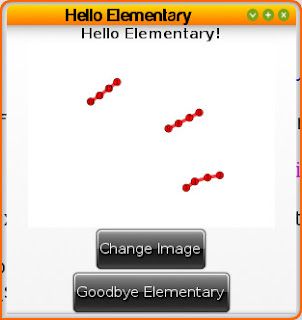
Elementary has a built in FileselectorButton object that when clicked presents our user with a nice file selector GUI:
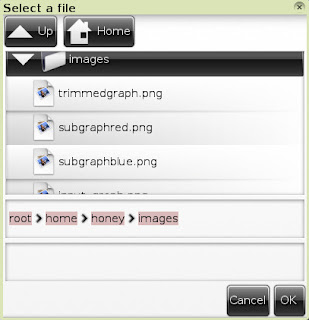
The new code to add this file selector button looks like:
 #Creates a "FileselectorButton" object. This is a button (just like we have created before) except that when it is click it automatically opens a file selector window
 fsb = elementary.FileselectorButton(window)

 #We can set the text of our fsb just like a normal button text
 fsb.text = "Change Image"

 #Tooltip for mouse over
 fsb.tooltip_text_set("Click Me!")

 #This tells our file selector window what to do when our user selects a file. The first argument is the callback function we want run and our second argument is our image object we want to change the display of
 fsb.callback_file_chosen_add(change_image, ic)

 #Show our button
 fsb.show()

 box.pack_end(windytax)
 box.pack_end(ic)
 #Pack our file selector button between our image and button
 box.pack_end(fsb)
 box.pack_end(button)

 window.resize_object_add(box)

 window.resize(300,300)

 window.show()

#Our fileselector callback. The file argument is the fileselectbutton object. The second argument is the full path to the file that was selected. The final argument is the image object we passed to this callback
def change_image(fsb, file_selected, image):
 #Check to make sure a file of some sort was selected. If nothing was selected file_selected will equal None type
 if file_selected:
 #These are the extensions we will allow our program to display
 validExtensions = [".png", ".jpg", ".gif"]

 #Use the os module to easily get the extension of our file
 fileName, fileExtension = os.path.splitext(file_selected)

 #If the extension is in our validExtenions lets check the image we are displaying!
 if fileExtension in validExtensions:
 image.file_set(file_selected)
Example 5:
Lets add one finishing touch to our application. If our user selects a file to display that doesnt have a valid image extension lets send them a popup telling them why the image displayed wasnt changed:
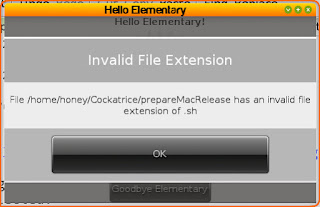
Showing a popup of this nature is fairly easy using elementarys Popup object. So the final edit to our code looks like this:
#This time we also pass the window object to our change image function. The reason for this is that our popup object needs a parent window object
def change_image(fsb, file_selected, image, window):
 if file_selected:
 validExtensions = [".png", ".jpg", ".gif"]

 fileName, fileExtension = os.path.splitext(file_selected)

 if fileExtension in validExtensions:
 image.file_set(file_selected)
 else:
 #if we have an invalid extension lets give the user a popup message telling them why the image didnt change

 #Create a popup message
 popup = elementary.Popup(window)

 #Set the title of our popup
 popup.part_text_set("title,text", "Invalid File Extension")

 #Set the text of our popup
 popup.text = "File %s has an invalid file extension of %s"%(fileName, fileExtension)

 #Create a button object
 bt = elementary.Button(window)

 #Set its text
 bt.text = "OK"

 #Define a callback that is called when the button is clicked, lets pass our popup object to this call back so we can close the popup when the user presses OK
 bt.callback_clicked_add(bnt_close, popup)

 #Sets content for our popup. The first argument is an arbitrary name for the content piece and the second argument is the elementary object you would like displayed for the content
 popup.part_content_set("button1", bt)

 #Show the popup to our user
 popup.show()

#The callback for our popups OK button. The first agurment is the button object itself and the second object is the popup we passed to it
def bnt_close(bt, popup):
 #Lets delete the popup so it goes away
 popup.delete()
Hope everyone learned something today! Have any questions feel free to drop a comment below or start a discussion on our user boards.
Resources for this Lesson:
- Displaying Images
- Image
- FileselectorButton
- Popup
download file now

Saturday, September 23, 2017
trials and tribulations of Comcast
trials and tribulations of Comcast
Its been months since our Comcast Internet service worked. It had worked flawlessly for years but last April the modem started going offline periodically. Finally gave up on it over the summer after at least 6 hours on the phone with their technical support, one in person visit from a tech, and switching out all our hardware. Regrouped in October because the alternate DSL service was so pitiful. One tech came in and found that the insulation housing for the cable going from street to house was stripped over a meter long section. We both agreed this must be it. Of course, 15 minutes after the tech left the modem went offline again. Two weeks later I scheduled another tech who immediately went to the pole across the street, replaced some hardware and voila, after at least half a year we have reliable service again. Moral: persistence pays. Amazement: Comcast technical support on the phone is always certain that its you who is doing something wrong. They never think it could be a physical hardware issue. Have to add that everyone at Comcast was always nice about it and I picked up various credits along the way.
download file now
Thursday, September 21, 2017
Udev Discover Tool for udev testers coders hackers and consumers
Udev Discover Tool for udev testers coders hackers and consumers
Udev discover aims for being a gnome-device-manager-like app using gudev instead of HAL, and to provide some fancy features for udev users and hackers.
Main features:
Browsing the sysfs tree via udev
Reports udev device info and udev properties
Filter and search devices
Monitorize udev device events
Install Udev Discover on ubuntu Natty
Open the terminal and run the following commnads
sudo apt-add-repository ppa:fontanon/udev-discoverYou can run this application using the following command from your terminal
sudo apt-get update
sudo apt-get install udev-discover
udev-discoverScreenshot

download file now
TUTUS AND TENNIS SHOES FREE DOWNLOAD by Byrd
TUTUS AND TENNIS SHOES FREE DOWNLOAD by Byrd
| Name: | Tutus And Tennis Shoes Free |
| File size: | 17 MB |
| Date added: | April 21, 2013 |
| Price: | Free |
| Operating system: | Windows XP/Vista/7/8 |
| Total downloads: | 1062 |
| Downloads last week: | 16 |
| Product ranking: | ★★★★★ |
 | |
He looks older than my brother. We arrived at an agreement after two hours discussion. This doesnt work. We use a lot of water every day. He gets his hair cut once a month. I won the lottery. Which one do you want? I think so. After I graduate Ill probably go back home and try to get a job. Will he come tomorrow? Alls fair in love and war.
Tutus And Tennis Shoes Free: - We are not amused.
- I plan to contact Tom by phone tomorrow and ask him to help us.
- I didnt want this to happen.
- Hi, is James there please?
- I dont know why the meeting was postponed.
- Sure, no problem. Here you are. Thatll be 25 dollars.
- It seems like you got up on the wrong side of the bed this morning.
- Can I see that one?
- I am not accountable to you for my actions.
- TUTUS AND TENNIS SHOES FREE DOWNLOAD
- We found him alive.
Who called you? Hello sir, welcome to the French Garden Restaurant. How many? What I reckon is... I dont like waiting in queues. The workers are on strike. What kind of meal did you eat? Actually, its not that good. I can read but I cant speak very well. I havent had a lot of chance to practice. This is my daughter. They were very excited. Fashions change quickly.
Tutus And Tennis Shoes Free charts
Tutus And Tennis Shoes Free location
Tutus And Tennis Shoes Free google search
Tutus And Tennis Shoes Free ask google support
Tutus And Tennis Shoes Free chrome extensions
Tutus And Tennis Shoes Free for android
Tutus And Tennis Shoes Free videos
Tutus And Tennis Shoes Free twitter search
Tutus And Tennis Shoes Free wiki
Tutus And Tennis Shoes Free photos
Tutus And Tennis Shoes Free world
Tutus And Tennis Shoes Free youtube videos
Tutus And Tennis Shoes Free bing photo search
Tutus And Tennis Shoes Free, Inc. 81166 Murfreesboro Street, Tennessee 4009 - USA, CA 37131 Tel: 605-105-2382 - Fax 830-942-4768 E-mail:Randy_Byrd@gmail.com
Tutus And Tennis Shoes Free address

Tutus And Tennis Shoes Free world
download file now
Ubuntu Installer Paid 2 0 Cooked and ready to be tasted
Ubuntu Installer Paid 2 0 Cooked and ready to be tasted
Well tasted by my beta testers anyway...but yes 2.0 for the Paid app is ready! so long as there are no more bugs the new update will be loaded to the market tomorrow.
Note that once the new update is on-line the sale will end, so if you have not already grap your paid copy for 20%!!
The change log for the new version is:
*New V5 small image, featuring fixed Java, even more lightweight (now around 1.2GB free) and user can set screen size on boot
*PAID New Build guide which shows you how to build your own Ubuntu images
*Brand new UI To make the whole thing more useable
*PAID new one click boot feature to allow quick booting from either the widget or inside the app
*PAID new widget to activate the one click boot
*PAID app install guide changed in light of one click boot
*Fixed keyboard mapping of random letters in Gnome
The free version should then be updated by the end of next week and will include the new UI and the new V5 small image and Gnome mapping fix.
Backtrack will then be updated shortly after that to include pretty much everything in the change log above (apart from the small image, there is still no small image for backtrack)
download file now
Wednesday, September 20, 2017
TwimGo 3 1 1 available for Belle Anna all Symbian 3 And S60v5 Free Download
TwimGo 3 1 1 available for Belle Anna all Symbian 3 And S60v5 Free Download
The application, still in beta, is getting a little update and the developer has released a version compatible client Belle.

download file now
Saturday, September 16, 2017
Ubuntu 12 04 new DNS and VPN issues
Ubuntu 12 04 new DNS and VPN issues
1. resolvconf is now used by default
2. a local resolver is now hardcoded into network manager and is used by default
This means that youll see nameserver 127.0.0.1 in your /etc/resolv.conf at all
times, while the real DNS config is managed by dnsmasq started by NetworkManager.
You can see the current DNS config in /run/nm-dns-dnsmasq.conf
There are numerous issues that this approach introduces. More info on the change and possible issues/solutions are here - http://www.stgraber.org/2012/02/24/dns-in-ubuntu-12-04/
My issue was that one of the VPN providers wasnt properly sending the search domain, so I couldnt access the servers by names on this network.
The easies solution is to add the DNS and search domains manually

download file now
Friday, September 15, 2017
Ubuntu and RocketFish RF FLBTAD bluetooth dongle
Ubuntu and RocketFish RF FLBTAD bluetooth dongle
I bought the RocketFish RF-FLBTAD bluetooth dongle today. When it was plugged into the front USB ports of my computer, the dongle would not be recognized as an HCI device. However, when I plugged it into one of the USB ports in the back of my computer, it registered just fine. Lots of good messages in /var/log/syslog. Update: The dongle disappeared when I rebooted. However, it came back when I manually ran:
sudo /etc/init.d/bluetooth restartdownload file now
Thursday, September 14, 2017
Twitter how to sign up log in down load and how to find friends on twitter
Twitter how to sign up log in down load and how to find friends on twitter

Register/Sign Up, Login Find friends and how to Download twitters application in your phone in https://twitter.com/
Twitter is is just like any other social networking service that enables users to send and read short 140-character messages called "tweets"Twitter only allow registered users to read and post tweets while unregistered users can only read them. The users of twitter can access it in two ways , you can either access twitter in their official website https://twitter.com/ or you can access it through a mobile device application which am going to put you as we proceed.
Twitter was developed and in March 2006 and lunched in July the same year. As of 2012 twitter recorded having more than 100million active users who in who posted more than 340 million tweet per day so Create twitter account to day and tell the World what you fill and connect with you friends
How to register/create/sign up account and log in twitter account
In other for us enjoy unique futures of twitter you have to have an account with them firstNow this a step by step on how how to create account/ sign up/ register twitter account
- First visit this url/website https://twitter.com/ and a box like this will display on your browser

- Fill in the appropriate information that displayed on the box
- click sign up for twitter
- Another box will also display requiring your username
- Fill it up and click sign up
- Another box will also display requiring your phone number and your country fill it and click verify
- Finally verification code will be sent to your phone put in the box and click verify
- You now have a twitter account start enjoying
Now this is how to log in your twitter account
Just like i said above you can either log in with twitter official website https://twitter.com or you can do it in your phone and that is only when you have the application in your phone, Now this how to log in with the official web- Visit this link/Url/ website https://twitter.com/ and a box like the previous one will display
- Right on the top of the box
- Put your email/phone number or your Username and click log in
Features of twitter
You may one to start using twitter after to day when you know about the unique features of twitter which am going to be listing one after the other here in this online tutorial.- Even though a know registered person can read a post on twitter you can choose to send to your friends alone.
- You can also follow other users
- With twitter you can also update your profile mobile phone
- You can share your post 100millions of User of twitter
- Twitter does not charge in before you can use ( it is free of charge) but accessing it through mobile phone may incur some share by your network provider service is free
download file now
Ubuntu 14 Desktop Install Fira Sans And Fira Mono Fonts
Ubuntu 14 Desktop Install Fira Sans And Fira Mono Fonts
Mozilla has created its own font family, Fira Sans and Fira Mono. Something that makes the mono font fairly useful/unique is that it appears to have a lot of vertical spacing. This means it could be a "workaround" for the fact that you cannot set line spacing in gnome terminal.
Install
Run the command below and it will do everything for you.
wget -O - http://pastebin.com/raw.php?i=f89cQkcV | tr -d | sudo bash
References
- WebUpd8 - Try Fira Sans, A Free Font Family Commissioned By Mozilla
download file now
tv on pc with progdvb and vplug
tv on pc with progdvb and vplug
First of all, you will need a good computer that has no problems handling audio and video streams. Second of all, you will require a satellite dish, and nevertheless a TV-tuner card with satellite support ( i would suggest a Skystar2 from Technisat )
Next you will be installing ProgDvb from their official website and start scanning your satellites ( in case you have more than one ).
Here is where it gets tricky, since no one man can be satisfied with such small amount of channals that come FTA (free to air), so you will be more than content to read the following section of the article.
Vplug, a plugin developed by vahid, holds all the answers you seek. With this tool you can decript the stream without the "intervention" of a smartcard. Now Im legally obligated to tell you this is illegal, and it servers only for education purpuses, so be carefull how you use it.
This tool decripty Nagra and Nagra 2 ( some SECA and CRIPTOWORKS as well ), most known package being DigiTV ( Europe ) after PREMIEREs so called blackness
download file now
Wednesday, September 13, 2017
Ubuntu Natty And Unity
Ubuntu Natty And Unity
Edit: Alt+F2 still brings up a run command prompt that actually works. Unity is damn confusing. Which brings to mind something else thats missing. An introduction to Unity and what it does.
download file now
Ubuntu Oneiric 11 10 Released Detailed Review and Tips
Ubuntu Oneiric 11 10 Released Detailed Review and Tips

Take the Tour:
http://www.ubuntu.com/ubuntu/take-the-tour
So here is a list of important changes that Oneiric has came across.
Ubuntu Oneiric comes in Hybrid ISO images and it is the first Ubuntu release featuring Linux Kernel 3.x, Gnome 3.x and also Multiarch support.
download file now
Tuesday night commentary from your editor and some useful links too
Tuesday night commentary from your editor and some useful links too
- Apple took swift measures to clobber the malware Arnold and I reported on Sunday. That said, if you use Transmission as your BitTorrent client, make sure to update to the latest version.
- Just in case, Macworld UK has instructions about disinfecting your Mac from this pest.
- J. R. Bookwalter reviews a device that brings OTA TV to your iPad on Macworld.com
- We are just three weeks away from Batman vs. Superman, so put on your costume and stand in line on Hollywood Blvd for tickets.
- Interesting article at Slate.com regarding Flowwrite, a new iPad that supposedly causes you to write more. But $10 for a combination text editor and stopwatch?
- Teenagers react to seeing Windows 95 on an old Dell PC and big for its time CRT monitor.
- Oculus Rift CEO says that Macs are not good enough for his brand of Virtual Reality. (And suddenly�his iPhone stopped working. Wonder why? )
- For those of you not wanting to be chased by trolls and dragons while wearing goggles, feast your eyes on these real reality pictures taken by astronaut Scott Kelly during his year in space.
- A new project brings a wireless dock to the iPad and Mac. You could use a mouse on your iPad Pro!
- Finally,Ray Tomlinson,� the inventor of e-mail, has died at the age of 74. No, he didn�t invent the fake Viagra e-mail filling up your Inbox.
�
Tom Briant
Editor, MacValley Blog
download file now
Two Lubuntu and Xubuntu blog to explore
Two Lubuntu and Xubuntu blog to explore
Today I am going to tell you something about two blogspot blogs. Day by day LXDE and XFCE based distributions are coming infront of main stream Linux world. Many of us starting to love these lightweight operating systems. But there are not much blog which published tips and tricks about these desktop environments. Recently I found two blogspot blogs which are not official but publishing many valuable, informative, importent tips and tricks about LXDE and XFCE.
 |
| Lubuntu Tips |
I dont know the man behind this blog. But I honor her/his effort to teach us about Lubuntu and LXDE. I learned many tips from this blog. I will publish some of them in my blog from "Lubuntutips" blog. Tips, tricks, hacks, customisation, decoration, various information and news about Lubuntu and lxde are available there. I really love this blogsite and visit it regularly. I am really learning miscelanious information from there.
My another favourite blog is http://xubuntugeek.blogspot.com/
 |
| Xubuntu Geek |
If you are a user of Lubuntu or Xubuntu, then these sites must help you much better then any other blog. I wish these blogs will continue their journey for many years and help people to solve various problem. I will publish some tips, tweek, hacks and informations from these blogsite with acknoledgement in the next days.
LubuntuTips address: http://lubuntutips.blogspot.com/
XubuntuGeek address: http://xubuntugeek.blogspot.com/
- LXDE on NetGator blog
- Lubuntu on Netgator blog
- Xubuntu on Netgator blog
- XFCE on Netgator blog
download file now
Ubuntu 16 04 Review and Linux current state
Ubuntu 16 04 Review and Linux current state
Ubuntu 16.04 Review and Linux current state

In this video i want to review ubuntu 16.04 and talk about the state linux is currently in.
You might think why am i reviewing ubuntu release after so much time has passed. Well i wanted to fully test it before i would make a verdict.
I should point out that i have been a supporter of canonical and ubuntu for some time now and it is becoming hared and harder to defend it.
When you install ubuntu 16.04 you will be hard to find any difference between 14.04 and 16.04 well now you have a different software center that from my experience works worse, let me clarify will it faster to open, but it doesnt shows all the software that are in the repository and installing software is an adventure it might install software or it might not. It is like rolling a dice, i am not even talking about the bug it originally had that it couldnt install deb files. Yes you couldnt install deb files with software center just imagine how awesome would it be for a user that has switched from windows to find out that he cant install files like he is used to, and he should have used terminal. i am not even talking about the constant updating reminder notification but when you try to update the system the update manager tells you that there arent any updates.
Lets talk about UI now there is a saying "If its not broke, dont fix it" well i think canonical are swear by this, lets be honest unity UI is an acceptable UI that needed ton of work to become a good UI for example when i am working on documents and have multiple doc files opened it is very hard to navigate in unity and now they added a feature that divides open folders by partition in where they are. So i am struggling finding in what directory i have my documents stored and constantly looking through every notification.
However the biggest issue i have is with the performance!!!!!! Originally linux was always lighter then windows and this was one of the selling point of linux but now i believe that it is more hungry for resources then a clean windows 10 installation. Yes i know when you install few software on windows it will slow down, but it is a huge problem when ubuntu decided to say no to optimizing and every release they are becoming more resource hungry. Plus there is no way to justify this because unlike other operating systems they arent adding anything to the system.

So now lets talk about the current state of linux when i first used linux it was in 2008 and now it is 2016, let me explane what was going on in 2008:
Well in 2008 everyone was using windows XP (Few days ago i used windows xp to refresh my memory) it was a terrible operating system it was constantly crashing, it was slow, it needed drivers for everything, it was a huge MESS, so in 2008 when i used ubuntu 8.04 i was really surprised how good it actually was sure it crashed, sure it would become slow, sure it had driver issues, but this was nothing out of the ordinary for that time and ubuntu was much more stable and fast compared to windows. NOW IT IS 2016 and i should say that unlike other operating systems linux barley has improved for average pc user (Windows is very stable operating system and believe it or not it is light weight as well), but you might tell me we have zfs we have this and that..... but does it really matter for an average pc user ??? NO!! it doesnt for average pc user the most important thing is how good does it opens software that he is interested in.
In this aspect we the linux users are getting screwed, linux users are getting inferior software (product) compared to windows users even firefox (open-source frontiers) developers say that linux version is worse then windows version and blame the market share (they cant devote a lot of developers for such a small market such as linux) dont believe me go ahead and benchmark firefox on linux and windows you will see how much faster windows version is.
Other then web browser average user will use a office suit well same problem here you might encounter files that libreoffice cant open (I did and filled up a bug report) so here we are screwed as well!! What about video card drivers and games well of course we get inferior product here as well, games run much worse on linux, and dont let me get started about video card drivers. So at the end of the day linux users can copy files faster from one directory to another that is where we have an edge on other operating systems. YES!!! we are dominating.
I am not saying linux isnt amazing but it is amazing for big companies and for developers but for average user linux is years behind compared to windows. This are users who dont care how much information is microsoft is taking, users only care about how efficient their software works and in this aspect linux is rather inferior.
If you been watching linux action show you will know that they are using macs for the production and even though they are trying to replace them with linux they are on again off again it because they struggle with linux. So if they struggle with linux and they cant trust it just imagine how much problems will an average pc user will have. Lets stop sugar coating our situation it isnt that good and lets look the reality in they eye.
It really sucks in what situation linux actually is but lets look at the reality and try to improve it, but because linux has such a small market i honestly dont know if situation will ever improve for linux users, because unless its market share will grow i dont think the developers will really make high quality ports (versions) for it.
download file now
Tuesday, September 12, 2017
TrueOS 2017 Installation and Review on VMware
TrueOS 2017 Installation and Review on VMware
 |
| TrueOS 2017 Installation and Review on VMware |
This tutorial shows TrueOS 2017 installation and review on VMware Workstation/Player step by step. This tutorial is also helpful to install TrueOS 2017 on physical computer or laptop hardware. We also install VMware Tools on TrueOS for better performance and usability features such as Fit Guest Now, Drag-Drop File, Clipboard Sharing and Mouse Integration.
TrueOS 2017 Installation Steps:
- Download TrueOS 2017 ISO
- Create Virtual Machine on VMware Workstation/Player
- Start TrueOS 2017 Installation
- Install VMware Tools
- Test VMware Tools Features: Fit Guest Now, Drag-Drop File, Clipboard Sharing and Mouse Integration
- TrueOS 2017 Review
Installing TrueOS 2017 and Review on VMware
What is TrueOS?
TrueOS (formerly PC-BSD or PCBSD), is a Unix-like, desktop-oriented operating system built upon the most recent releases of FreeBSD-CURRENT. To accomplish this, it provides a graphical installation to enable even UNIX novices to easily install and get it running. It pre-configures desktop environments, video, sound, and networking so that the desktop can be used immediately. A graphical software installation program makes installing pre-built software as easy as other popular operating systems.TrueOS Website: https://www.trueos.org/
TrueOS 2017 New Features and Improvements
The TrueOS team has released a new snapshot of the operating systems Desktop and Server editions. The new snapshot includes several bug fixes, a few new services and package updates. TrueOS 2017-02-22 also includes support for automounting devices and a new jail management utility. Automounting is a new feature allows auto-detection and mounting of inserted USB devices. It also automatically unmounts USB devices when the user ceases accessing the device. New jail utilities jbootstrap (requires being run once to fetch base packages), jinit, and jdestroy are available. These support OpenRC development and add other functionality.TrueOS Minimum System Requirements
TrueOS has moderate hardware requirements and commonly uses low system resources. Before installing TrueOS, make sure that your hardware or virtual machine at least meets the minimum requirements. To get the most out of your TrueOS experience, use a system that meets the recommended system requirements.- 64-bit processor
- 1 GB RAM
- 20GB of free hard drive space on a primary partition for a command-line server installation
- Network card
TrueOS Recommended System Requirements
The following are the minimum recommended requirements. More RAM and available disk space will improve your computing experience:- 64-bit processor
- 4 GB of RAM
- 50GB of free hard drive space on a primary partition for a graphical desktop installation
- Network card
- Sound card
- 3D-accelerated video card
Hope you found this TrueOS 2017 installation and review tutorial helpful and informative. Please consider sharing it. Your feedback and questions are welcome!
download file now
Monday, September 11, 2017
Ubuntu 11 10 aireplay ng and the mon0 is on channel 1 error and how to fix it shell script included
Ubuntu 11 10 aireplay ng and the mon0 is on channel 1 error and how to fix it shell script included
I had recently upgrade my Ubuntu install to 11.10. Along with other annoyances I came across I ran into a bit of a deal breaker when I went to run aireplay-ng. I was getting the following error:
mon0 is on channel -1, but the AP uses channel [#]
This was going to be a huge problem since I know that my ZyDAS 1211 chip set was compatible with packet injection. After searching around for a bit I found a great solution from this site here about the drivers and how to patch and reinstall the older ones back in. Below I have a script that you can run to get that installed.

==================================================================
#!/bin/bash
#
# This fix was found at:
# http://linux-software-news-tutorials.blogspot.com/2011/06/solve-error-mon0-is-on-channel-1-but-ap.html
#
# If this script helps you be sure to drop him a line and
# say thanks!
echo -e " 33[1;32m###########################################"
echo -e "# Ubuntu Patched Drivers Installer Script #"
echo -e "# Tested on Ubuntu 11.04 and 11.10 #"
echo -e "###########################################"
echo " Coded By: Travis Phillips"
echo " Date: 01/18/2012"
echo " Website: http://theunl33t.blogspot.com"
echo -e -n " [*] Installing build-essential...33[0m"
sudo apt-get -y install build-essential &> /dev/null
echo -e "33[1;32mDone!"
echo -e -n " [*] Downloading Wireless Drivers...33[0m"
wget http://wireless.kernel.org/download/compat-wireless-2.6/compat-wireless-2011-06-16.tar.bz2 &> /dev/null
echo -e "33[1;32mDone!"
echo -e -n " [*] Extracting...33[0m"
tar -jxf compat-wireless-2011-06-16.tar.bz2
cd compat-wireless-2011-06-16
echo -e "33[1;32mDone!"
echo -e -n " [*] Downloading Patches...33[0m"
wget http://patches.aircrack-ng.org/mac80211.compat08082009.wl_frag+ack_v1.patch &>12 /dev/null
wget http://patches.aircrack-ng.org/channel-negative-one-maxim.patch &>12 /dev/null
echo -e "33[1;32mDone!"
echo -e -n " [*] Applying Patches...33[0m"
patch -p1 < mac80211.compat08082009.wl_frag+ack_v1.patch &> /dev/null
patch ./net/wireless/chan.c channel-negative-one-maxim.patch &> /dev/null
echo -e "33[1;32mDone!"
echo -e " [*] Building patched drivers and installing."
echo -e " 33[31mTHIS WILL TAKE ABOUT 5-10 mins..."
echo -e " Please be patient and do *NOT* interrupt this process33[0m "
make &> /dev/null
echo -e " 33[1;32m[*] Compiling Complete. Installing Drivers...33[0m "
sudo make install &> /dev/null
echo -e "33[1;32m[*] Installing Patched drivers completed!"
echo -e -n " [*] Cleaning Up...33[0m"
cd ..
rm compat-wireless-2011-06-16.tar.bz2
rm -rf compat-wireless-2011-06-16
echo -e "33[1;32mDone!"
echo -e " [*] 33[1;37mScript Finished! Please reboot to finish the patch.33[0m "
==================================================================
To run save it to a save to a file called patchwifidrivers.sh and in a terminal type
chmod +x patchwifidrivers.sh
./patchwifidrivers.sh
Hope this helps some people.
download file now
Sunday, September 10, 2017
Troll and I Incl Update 2 Repack
Troll and I Incl Update 2 Repack

REPACK � INCL UPDATE 2 � ONE FTP LINK � TORRENT
Embark on a wild adventure and discover the unbreakable bond between Troll and Otto�
DESCRIPTION / DOWNLOAD
ABOUT THE GAME
Embark on a wild adventure and discover the unbreakable bond between Troll and Otto, two outcasts struggling to survive and find their way back home.
Title: Troll and I�
Genre: Violent, Action, Adventure
Developer: Spiral House Ltd.
Publisher: Maximum Games
Release Date: 21 Mar, 2017
Repack By: FitGirl
Notes: this game requires Windows 8 system or above.
Troll and I Incl Update 2-Repack
Size: 6.4 GB
����������-
ONE FTP LINK
TORRENT
ANOTHER TORRENT
ANOTHER TORRENT
Enjoy
SYSTEM REQUIREMENTS
MINIMUM:
- OS: Windows 10
- Processor: Intel i5
- Memory: 8 GB RAM
- Graphics: 2GB of VRam, Nvidia 6 series
- Storage: 19 GB available space
- Sound Card: On board Motherboard
RECOMMENDED:
- OS: Windows 10
- Processor: Intel i7
- Memory: 8 GB RAM
- Graphics: 3GB of VRam, Nvidia 7 series or above
- Storage: 19 GB available space
- Sound Card: On board Motherboard
SCREENSHOTS


GAMEPLAY
INFO
- Extract
- Burn or mount the .iso
- Run setup.exe and install
- Play
download file now
Saturday, September 9, 2017
Ubuntu and Natty Update
Ubuntu and Natty Update
So another day and another quick update on life with Natty. Yesterday I hit a new problem. Ubuntu kicked me out to the GDM login screen with no warning. Im not even sure what log to check to find out what went wrong there. But logging in again was no big deal. I also had something of an epiphany.
When I upgraded to 10.10 I was running MediaTomb. Which made the OS somewhat unstable. Removing MediaTomb and reinstalling it fixed the problem. So for the time being. Ive ditched MediaTomb. The improvements have been instantly felt. Boot ups no longer require the filesystem to be checked on every boot.
However I was also messing around with Kubuntu on a VirtualBox virtual machine. Im thinking maybe VirtualBox still has some issues with Ubuntu Natty. It seemed a bit slow at time. However that may be due to Boinc which I also have running in the back ground. Boinc is next on the hit list. I think I may confine it to a virtual machine. First though I need to figure out how to make a minimal Ubuntu installation disc.
The reason I was playing with Kubuntu was because Im thinking of ditching Unity and Gnome altogether and moving wholesale to Kubuntu. Which raised a question in my mind. Why arent Canonical putting all their efforts into Kubuntu? KDE already does more or less everything Canonical are developping for the Unity interface. Not only that but all the effects and features of KDE are integrated with the desktop environment already. Certainly theres room for improvement. But so far as i can see. Everything Unity offers is already there in KDE. It seems to me KDE is a much better launchpad for Canonical than Gnome will ever be.
download file now