Showing posts with label alpha. Show all posts
Showing posts with label alpha. Show all posts
Thursday, September 14, 2017
TwelveSky2 CN Alpha Test without Activation Code
TwelveSky2 CN Alpha Test without Activation Code
Twelve Sky 2 (?????? OL?) is a free-to-play 3D MMORPG developed by Gigas Soft.
The first generation of TwelveSky makes its debut from 2007,and became a popular online game gradually in Korea,Taiwan,Japan,etc.

Now,TwelveSky2 CN Alpha Test will kicks off on 18th,Jun,and its not have to login game with Activation Code.
Announcement page:
http://12sky.gxcw.com/index.php?m=content&c=index&a=show&catid=429&id=51
Everyone can get access to 12Sky2 by registering an account.
Here I wanna share a guide on how to register,download and install TwelveSky2 CN to users who want to play it but not living in China.
Hope it useful!
PS: My mother language is not English,sorry in advance for any formatting or spelling errors.
NOTE:


To TwelveSky2 CN, we need to change computers system locale to Chinese. Otherwise, the game might not work properly and you wont be able to see Chinese text in the launcher.
Here we go:
Step 1. Download
First of all,its strange that 12Sky2 CNs official site is not good as others,because there are always 404 pages(so sad),like the download link.
So,to save your time,plz refer to links in this article which there are all correct and effective.
TwelveSky2 CN official site:http://12sky.gxcw.com/
Download page:http://12sky2.gxcw.com/download/download.html
Plz head to the second one to download like the following pic:
Click it and download the Zip file to get TwelveSky2 client.
Step 2.Install
When download finish,unzip file and run the "Launcher" progarm.The TwelveSky2 shortcut will be show up on desktop after unzip successfully.
Click the shortcut to enter game,then you will find that it need to be upgraded to the latest version.And it does take time.
So,lets create an account during this time.
Step 3.Registration
Registration page:http://12sky2.gxcw.com/index.php?m=member&c=index&a=register&siteid=1
Head to this page to sign up and click "??"(Yes) .
Fill in these blanks and click"????"(Submit) to sign up TwelveSky2.
Then it will tell you that you register successfully.
Step 4.Enjoy
TwelveSky2 Alpha Test will be beginning on 10:00 am,18th.Jun,2016(Beijing Time) officially,recommend you guyz upgrade it to the latest version before,since it does take time to update.(ORZ)
When you make it,just login TwelveSky2 client with your account,and you can play this Korean martial arts online game.
When you play the Chinese server online games ,the speed will be very slowly that latency is unavoidable.Tons of gamers are using VPN or ping booster to reduce ping,stabilize connection,avoid packet loss around the world.
On a personal note,Lonlife is a good VPN/ping booster to help players slove those problems,and it does work for me and my friends.Recommend you guyz!
Surely,there are many other boosters you can choose,just try all out and find the best for you!
HAVE FUN!
download file now

Friday, September 1, 2017
Ubuntu 12 10 Alpha 2 released
Ubuntu 12 10 Alpha 2 released
Alpha 2 for Ubuntu 12.10 has been made available. Most changes are more or less internal and nothing that will clearly be visible. Alpha releases are usually not suited for general usage, though you can check it out via a live CD. Of course, developers will be very interested in whats new.
download file now
Sunday, August 27, 2017
Ubuntu MATE 15 04 Vivid Vervet Alpha 2 Released
Ubuntu MATE 15 04 Vivid Vervet Alpha 2 Released
Along with the official Ubuntu flavors, Ubuntu MATE 15.04 Vivid Vervet alpha 2 was released yesterday. Read on to find out whats new.

Ubuntu MATE is an unofficial (that will probably change in the future) MATE-based Ubuntu flavor. For those not familiar with MATE, this is a GNOME 2 fork introduced after GNOME 3 and GNOME Shell replaced the classic desktop metaphor. Currently, MATE only supports GTK2, but the plan is to add GTK3 support with MATE 1.12.
Compared to Ubuntu Mate 14.10, the latest Vivid alpha 2 (there was no alpha 1) release introduces some new packages installed by default:
- MATE Tweak (a MintDesktop fork) - lets you configure which icons to show on the desktop, enable/disable compositing, change the window buttons layout, show/hide icons in menus and buttons and more;
- MATE Menu (a MintMenu fork) - a searchable menu for the MATE panel. This is not the default menu, but you can add it to the panel by right clicking the panel, selecting Add to Panel and then adding "MATE Menu";
- Totem has been replaced by VLC.
 |
| MATE Menu (installed but not used by default) |
If youre using Ubuntu MATE 14.04 LTS, the changes mentioned above wont sound new to you. Thats because Ubuntu MATE 14.04 was released after 14.10 (back when Ubuntu 14.04 was released, Ubuntu MATE didnt exist) and it already incorporates these changes.
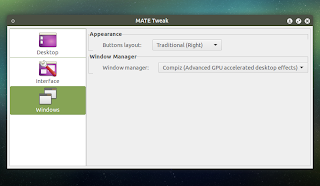
There is one new MATE Tweak feature though: you can now use it to switch between Compiz and Marco, just like in Linux Mint 17.1 MATE, an option that wasnt present in Ubuntu MATE 14.04:
Furthermore, Ubuntu MATE 15.04 ships with a new default theme: Yuyo-Dark (developed by Sam Hewitt) and theres also a light "Yuyo" alternative thats installed by default:
 |
| Yuyo Dark theme |
 |
| Yuyo theme |
The new Yuyo themes still need some work - for now, some UI elements such as check boxes and radio buttons arent rendered correctly, thats why Ambiant-MATE is still used for the live session and the LightDM theme, mentions the Ubuntu MATE 15.04 alpha 2 release announcement.
Other changes in Ubuntu MATE 15.04 Vivid Vervet alpha 2 include:
- updated the Ambiant-MATE and Radiant-MATE icon themes with green icons;
- added a few new community contributed wallpapers;
- enabled X zapping via Ctrl+Alt+Backspace;
- enabled screen reader activation via LightDM indicators and LightDM key bindings;
- enabled touch to click by default for touchpads;
- enable Tilda pull-down terminal integration. Press F12 to show/hide;
- all MATE package updates from Debian have been automatically synced to Ubuntu 15.04 and are available in Ubuntu MATE 15.04 alpha 2;
- ubuntu 15.04 has adopted multilib GObject introspection runtime (gir) which means Caja plugins now work "out of the box";
- other bug-fixes.
Download Ubuntu MATE 15.04 Vivid Vervet alpha 2
Download Ubuntu MATE 15.04 Vivid Vervet alpha 2
The link above includes the official release notes so make sure you read them before testing the latest Ubuntu MATE 15.04 alpha 2!
via Ubuntu MATE blog
download file now
Thursday, August 17, 2017
Ubuntu Natty Alpha 3 First Impressions
Ubuntu Natty Alpha 3 First Impressions
This will be a short post since I havent played with Ubuntu Natty for long. But first impressions are mixed if Im to be kind. On the upside Ubuntu is still usable. On the down side, its not what Im looking for in a desktop OS.
The new interface just sucks for desktop users. It might make sense on a tablet where only one application is being used at any given time. But it just doesnt work as a desktop GUI. I dont like it. Its not what Im used to and I dont want to be "converted". Imagine my eation then when I discovered the "Ubuntu Classic Desktop" option at the log-in screen. Then imagine my disappointment when I realised it didnt actually do anything yet.
Mono is once again a sore point. I just dont see the point. Mono doesnt bring anything to the mix that isnt already there. Other than possible legal troubles of course and a ridiculously bloated install foot print. So as you might expect I tried removing it. And guess what? Ubuntu didnt seem to lose any functionality that couldnt be replaced by installing alternatives. The applications I lost included Gbrainy, Tomboy Notes and Banshee. All of which I can live quite happily without.
OpenOffice.org has been replaced with Libre Office. Again Im not really sure what the advantage is other than Libre Office has been contaminated with OOXML support. Canonicals leanings towards Microsoft technologies is beginning to annoy. I moved to Linux to get away from Microsoft. Please for the love of all thats still pure in the world dont drive me on to a Mac.
The Gimp was notable by its absence. Which means Ill have to install it since I was planning on doing a clean installation for 11.04. Its not a hard thing to do. But the Gimp has been a standard application on the Linux desktop for so long. It just doesnt seem right its not there any longer. Im a Gimp user. So I need it.
The one thing that did really impress me with this installation was the new Ubiquity installer. Hopefully Ill have a video posted to YouTube soon. This is the one part of Ubuntu that has gotten better with every version of Ubuntu. This time around basic information is collected as the system is being set up. So its no longer a case of collecting data and then copying files. Files are copied while basic user data is collected. Which does speed up the whole process by a few minutes. And lets face it. Anything that helps cut down installation time has to be good.
The new interface just sucks for desktop users. It might make sense on a tablet where only one application is being used at any given time. But it just doesnt work as a desktop GUI. I dont like it. Its not what Im used to and I dont want to be "converted". Imagine my eation then when I discovered the "Ubuntu Classic Desktop" option at the log-in screen. Then imagine my disappointment when I realised it didnt actually do anything yet.
Mono is once again a sore point. I just dont see the point. Mono doesnt bring anything to the mix that isnt already there. Other than possible legal troubles of course and a ridiculously bloated install foot print. So as you might expect I tried removing it. And guess what? Ubuntu didnt seem to lose any functionality that couldnt be replaced by installing alternatives. The applications I lost included Gbrainy, Tomboy Notes and Banshee. All of which I can live quite happily without.
OpenOffice.org has been replaced with Libre Office. Again Im not really sure what the advantage is other than Libre Office has been contaminated with OOXML support. Canonicals leanings towards Microsoft technologies is beginning to annoy. I moved to Linux to get away from Microsoft. Please for the love of all thats still pure in the world dont drive me on to a Mac.
The Gimp was notable by its absence. Which means Ill have to install it since I was planning on doing a clean installation for 11.04. Its not a hard thing to do. But the Gimp has been a standard application on the Linux desktop for so long. It just doesnt seem right its not there any longer. Im a Gimp user. So I need it.
The one thing that did really impress me with this installation was the new Ubiquity installer. Hopefully Ill have a video posted to YouTube soon. This is the one part of Ubuntu that has gotten better with every version of Ubuntu. This time around basic information is collected as the system is being set up. So its no longer a case of collecting data and then copying files. Files are copied while basic user data is collected. Which does speed up the whole process by a few minutes. And lets face it. Anything that helps cut down installation time has to be good.
download file now
Sunday, August 13, 2017
Ubuntu Flavors 15 04 Vivid Vervet Alpha 2 Available For Testing
Ubuntu Flavors 15 04 Vivid Vervet Alpha 2 Available For Testing
The second alpha for the Ubuntu 15.04 Vivid Vervet flavors (Kubuntu, Ubuntu GNOME, Lubuntu and Ubuntu Kylin) has been released. Lets take a quick look at whats new.
As usual, Ubuntu (w/ Unity) doesnt take part in alpha releases. Also, the Ubuntu flavors not mentioned above (like Xubuntu) didnt take part in the Vivid alpha 2 milestone.
Ubuntu GNOME 15.04 Vivid Vervet Alpha 2

In Ubuntu GNOME 15.04 Vivid Vervet alpha 2, most GNOME components have been updated to the latest 3.14 version - this includes GNOME Shell, GNOME Control Center/Settings Daemon, Nautilus, Maps, Weather, Evince, Terminal and so on. Unfortunately, there are still a couple of apps that are quite old: Gedit and Videos (Totem), which are still at version 3.10.
Here are a few more Ubuntu GNOME 15.04 Vivid Vervet alpha 2 screenshots:


Another minor, but interesting change, is that Numix GTK theme is now installed by default. Adwaita continues to be used by default but Numix GTK theme is now just a few clicks away:

More information and download links for Ubuntu GNOME 15.04 alpha 2
Kubuntu 15.04 Vivid Vervet alpha 2

Kubuntu 15.04 will use Plasma 5 by default and unlike Kubuntu 14.10, there will be no alternative Plasma 4 ISO.
The latest alpha 2 ships with KDE Applications 14.12 and Plasma 5.2 beta, which include numerous changes, such as:
- new components (first release for Plasma 5): BlueDevil, KSSHAskPass, Muon, Login theme configuration (SDDM), KScreen, GTK Application Style and KDecoration;
- work in progress modules include Touchpad settings and User Manager;
- option to undo changes made to the Plasma desktop layout;
- KRunner (to trigger it, use Alt+Space): smarter result sorting, added audio player controls;
- Breeze window decoration theme is now used by default;
- many new Breeze icons;
- new white mouse cursor theme for Breeze;
- new plasma widgets: 15 puzzle, web browser, show desktop;
- KDE Frameworks 5-based versions of Kate, KWrite, Konsole, Gwenview, KAlgebra, Kanagram, KHangman, Kig, Parley, KApptemplate and Okteta.
Kubuntu 15.04 Vivid Vervet alpha 2 screenshots:


More information and download links for Kubuntu 15.04 alpha 2
Ubuntu Kylin 15.04 Vivid Vervet alpha 2
Ubuntu Kylin (an Ubuntu flavor for Chinese users) Vivid Vervet alpha 2 ships with LIM (locally integrated menus) enabled by default, with the new "always-show-menus" featured turned on, so it doesnt use autohide:

Also, the latest Kylin 15.04 alpha 2 release comes with "click to minimize" enabled by default for the Unity launcher, a feature thats of course, also available for Ubuntu (w/ Unity) users, but its not enabled by default.
According to the release notes, these changes are meant to "make Windows users easier to adapt to the Unity user interface".
Other changes in Ubuntu Kylin 15.04 Vivid Vervet alpha 2 include fixes for the Kylin-specific applications: Ubuntu Kylin Software Center, Youker Assistant, Chinese Calendar and Unity China Music Scope.
Here are a few more Ubuntu Kylin 15.04 alpha 2 screenshots (note that I installed Ubuntu Kylin in English, but some parts are not translated, thats why youll see a mix of English and Chinese in the screenshots):


More information and download links for Ubuntu Kylin 15.04 alpha 2
Lubuntu 15.04 Vivid Vervet alpha 2

For Lubuntu 15.04 Vivid Vervet alpha 2, theres no changelog available - the wiki page mentions that the "LXQt is still in development, so Vivid Vervet is another bug fix release. ". So it looks like LXQt wont make it in Lubuntu 15.04.
More information and download links
All the Ubuntu 15.04 Vivid Vervet alpha 2 flavors include Xorg server 1.16.2.901, Mesa 10.3.2 (but Mesa 10.4.2 is available in proposed) and the Ubuntu Linux kernel 3.18.0-9.10 which is based on the upstream 3.18.2 Linux kernel (for changes in Linux 3.18, see THIS page).
Up next in the Vivid Vervet release schedule: Beta 1 (for opt-in flavors), which should be released on February 26th.
download file now
Saturday, August 12, 2017
Ubuntu 16 04 2 and updated Ubuntu 17 04 pseudo Alpha 2
Ubuntu 16 04 2 and updated Ubuntu 17 04 pseudo Alpha 2
Update: This page refers to earlier work and my latest ISOs and kernel upgrade scripts can be downloaded from my latest post.
Please note my blog is intended to be the dynamic update content partner to my static core content pages on my website. This particular post relates to my http://www.linuxium.com.au/how-tos/runningubuntuontheintelcomputestick page where Ive created some Ubuntu ISOs whose purpose is to better support Intel Atom based devices.
Please note my blog is intended to be the dynamic update content partner to my static core content pages on my website. This particular post relates to my http://www.linuxium.com.au/how-tos/runningubuntuontheintelcomputestick page where Ive created some Ubuntu ISOs whose purpose is to better support Intel Atom based devices.
The latest mainline kernel v4.10 has just been released and the revised HDMI LPE Audio Support patch set for Intel Atom SoCs is now queued for mainline inclusion so we could see it in v4.11 in a couple of months and then hopefully in Ubuntu possible as early as 17.10. Additionally Canonical have just released Ubuntu 16.04.2 and introduced the rolling Hardware Enablement (HWE) kernels which aim to provide support for the latest hardware. As a result Ive decided to provide a single kernel which is effectively a HWE edge kernel specifically patched for Intel Atom SoCs in my ISOs to simplify kernel management and create a forward path for future migration to mainline kernels.
My new kernel is based on Canonicals next zesty kernel which is rebased to v4.10 and also available in xenial as hwe-edge. To this Ive added the latest HDMI LPE patches from Pierre-Louis Bossart, Jerome Anand & Takashi Iwai. Ive also added Mika Kuoppalads new anti-freeze patch, Hans de Goedes PWM, AXP288 and I2C patches, Pierre-Louis Bossarts PMC Platform Clock and Codecs patches, Bastien Noceras wifi patch, Laszlo-Fiats bluetooth patch and part of my bluetooth support is based on a script from Larry Finger. The kernel source is available on my github.
WIP includes providing backlight support for some devices and the ES8316 driver which is currently under development. Unfortunately as I dont have a tablet I cannot advise on the screen rotation issues however others have commented in previous posts with their solutions which Id recommend reading.
At this stage Im providing two ISOs: Ubuntu 16.04.2 (with kernel Ubuntu-4.10.0-9.11) and Ubuntu 17.04 pseudo Alpha 2 (with kernel Ubuntu-lts-4.10.0-9.11~16.04.2). Further flavours will be added once initial feedback has been reviewed together with updated 16.10 releases. Later I will also provided the corresponding kernel update scripts as I will maintain the kernels with security patches and/or Intel Atom SoC added functionality/improvements.
To try an ISO download it from the link below (in red) and write it to a USB using either Rufus in Windows or dd in Linux.

Ubuntu comes with everything. All the essential applications, like an office suite, browsers, email and media apps come pre-installed and thousands more games and applications are available in the Ubuntu Software Centre.
Ubuntu comes with everything. All the essential applications, like an office suite, browsers, email and media apps come pre-installed and thousands more games and applications are available in the Ubuntu Software Centre.
If freezing persists follow Len Brown suggestion of adding "intel_idle.max_cstate=2" as a kernel boot parameter which enables Core-C6 but disables module/package-C6. With the Alpha release (including the official version) the installation does not recognize previously installed OS so use Something else and manually set up your partitions. Prior to embarking on an encrypted LVM installation you should first open a terminal session and turn off swapping using the command sudo swapoff -a. If there is no wifi after booting devices with a Broadcom chip then reload the driver: in a terminal window enter sudo modprobe -r brcmfmac followed by sudo modprobe brcmfmac. Occasionally on some devices bluetooth doesnt initially load so it is necessary to restart the service: for Broadcom chip devices enter sudo systemctl stop brcmbt.service followed by sudo systemctl start brcmbt.service and for Realtek chip devices enter sudo systemctl stop rtl8723bsbt.service followed by sudo systemctl start rtl8723bsbt.service. Some devices still do not reboot (or warm restart) correctly which can result in a purple screen or lack of wifi and/or bluetooth on reboot. In these circumstances cycle the power and boot the device from cold.
Because my ISOs include a patched kernel it means no automatic Ubuntu kernel updates are provided. Consequently Ive also developed a manual patching process where a script can be downloaded and then executed to update the kernel to match the official releases. These kernel update scripts are only for updating the kernel after installing my ISOs otherwise you will be missing the userland files required for audio, wifi and bluetooth. To upgrade the existing installed kernel (created from my ISO or as a result of a previous upgrade) to the later version provided by the script first download the script and after making it executable (enter chmod 755 <script>) install it as root (by entering sudo <script>). Once the script has finished executing the device will need to be rebooted to use the updated (patched) kernel.
4.10.0-9.11~16.04.2 (superseded)
4.10.0-9.11 (superseded)
Dont forget when making a comment to include the name/model of your device and if reporting a technical issue please include a copy of the output from dmesg by sharing the log using pastebinit or similar.
download file now
Saturday, August 5, 2017
Ubuntu 12 10 Alpha released
Ubuntu 12 10 Alpha released
Precise Pangolin is still quite young, but were already on the way to 12.10 Quantal Quetzal. The first Alpha has been released and some changes you are already able to see. Latest software is includes, Rythmbox has a new look and Update Manager is now called Software Updater.

download file now
Thursday, August 3, 2017
Ubuntu 17 04 Zesty Zapus Alpha 2 has Released and Available For Download
Ubuntu 17 04 Zesty Zapus Alpha 2 has Released and Available For Download

The second alpha of the Zesty Zapus (to become 17.04) has now been released!
Ubuntu 17.04, code named Zesty Zapus, is the future release that will succeed Ubuntu 16.10, and even though it�s End of life date has been scheduled for January 2018, the development team aims to bring a lot of upgrades, fixes, and additions in this release.
This milestone features images for Lubuntu, Kubuntu, Ubuntu MATE, Ubuntu Kylin, Ubuntu GNOME, and Ubuntu Budgie.
Pre-releases of the Zesty Zapus are not encouraged for anyone needing a stable system or anyone who is not comfortable running into occasional, even frequent breakage. They are, however, recommended for Ubuntu flavor developers and those who want to help in testing, reporting and fixing bugs as we work towards getting this release ready.
Alpha 2 includes a number of software updates that are ready for wider testing. This is still an early set of images, so you should expect some bugs.
While these Alpha 2 images have been tested and work, except as noted in the release notes, Ubuntu developers are continuing to improve the Zesty Zapus. In particular, once newer daily images are available, system installation bugs identified in the Alpha 2 installer should be verified against the current daily image before being reported in Launchpad. Using an obsolete image to re-report bugs that have already been fixed wastes your time and the time of developers who are busy trying to make 17.04 the best Ubuntu release yet. Always ensure your system is up to date before reporting bugs.
Ubuntu 17.04 Release Schedule
Key dates during the Ubuntu 17.04 milestone are as follows, as listed in the official Ubuntu 17.04 release schedule:
Alpha 1 � 29 December (for flavours)
Alpha 2 � 26 January (for flavours)
Feature Freeze � 16 February
Beta 1 � 23 February (for flavours)
UI Freeze � 9 March
Final Beta � 23 March
Kernel Freeze � 30 March
Release Candidate � 9 April
Stable Release � 13 April
Be sure to mark the Ubuntu 17.04 release date in your diaries folks!
The Zesty Zapus will be supported for 9 months after release with select app updates, bug fixes and critical security patches, including new releases of Mozilla Firefox.
Lubuntu
Lubuntu is a flavor of Ubuntu based on LXDE and focused on providing a very lightweight distribution.
The Lubuntu 17.04 Alpha 2 images can be downloaded from:
http://cdimage.ubuntu.com/lubuntu/releases/zesty/alpha-2/
More information about Lubuntu 17.04 Alpha 2 can be found here:
https://wiki.ubuntu.com/ZestyZapus/Alpha2/Lubuntu
Ubuntu MATE
Ubuntu MATE is a flavor of Ubuntu featuring the MATE desktop environment for people who just want to get stuff done.
The Ubuntu MATE 17.04 Alpha 2 images can be downloaded from:
http://cdimage.ubuntu.com/ubuntu-mate/releases/zesty/alpha-2/
More information about Ubuntu MATE 17.04 Alpha 2 can be found here:
https://wiki.ubuntu.com/ZestyZapus/Alpha2/UbuntuMATE
Ubuntu Kylin
Ubuntu Kylin is a flavor of Ubuntu that is more suitable for Chinese users.
The Ubuntu Kylin 17.04 Alpha 2 images can be downloaded from:
http://cdimage.ubuntu.com/ubuntukylin/releases/zesty/alpha-2/
More information about Ubuntu Kylin 17.04 Alpha 2 can be found here:
https://wiki.ubuntu.com/ZestyZapus/Alpha2/UbuntuKylin
Kubuntu
Kubuntu is the KDE based flavor of Ubuntu. It uses the Plasma desktop and includes a wide selection of tools from the KDE project.
The Kubuntu 17.04 Alpha 2 images can be downloaded from:
http://cdimage.ubuntu.com/kubuntu/releases/zesty/alpha-2/
More information about Kubuntu 17.04 Alpha 2 can be found here:
https://wiki.ubuntu.com/ZestyZapus/Alpha2/Kubuntu
Ubuntu GNOME
Ubuntu GNOME is a flavor of Ubuntu featuring the GNOME desktop environment.
The Ubuntu GNOME 17.04 Alpha 2 images can be downloaded from:
http://cdimage.ubuntu.com/ubuntu-gnome/releases/zesty/alpha-2/
More information about Ubuntu GNOME 17.04 Alpha 2 can be found here:
https://wiki.ubuntu.com/ZestyZapus/Alpha2/UbuntuGNOME
Ubuntu Budgie
Ubuntu Budgie is a flavor of Ubuntu featuring the Budgie desktop environment.
The Ubuntu Budgie 17.04 Alpha 2 images can be downloaded from:
http://cdimage.ubuntu.com/ubuntu-budgie/releases/zesty/alpha-2/
More information about Ubuntu Budgie 17.04 Alpha 2 can be found here:
https://wiki.ubuntu.com/ZestyZapus/Alpha2/UbuntuBudgie
download file now
Ubuntu 11 10 Oneiric Ocelot Alpha 3 is Released!
Ubuntu 11 10 Oneiric Ocelot Alpha 3 is Released!
Well, it took a bit long than predicted but few hours ago the Ubuntu Linux developers officially announced the availability of the Ubuntu 1.10 Oneiric Ocelot Alpha 3, finally!. But before you jump into the downloading section please be aware that these images are over sized thus wont fit in the usual 700MB CD + are developers snapshots only.
So, unless youre a developer or a bug-tester, etc please dont use them and expect a stable environment since they arent even at the beta stage yet (which should be the next release actually). And as usual, simultaneously to this release other Ubuntu projects such as Kubuntu, Edubuntu, Mythbuntu and Lubuntu Oneiric Ocelot (including the Ubuntu server version) Alpha 3 images are also available.
Main changes...

*. Comes with the Kernel version 3.0.0-7.9 since the 11.10 will be using the recently introduced Kernel version 3.0 RC (well it aint that recent anymore!) which also brings some new features (even though according to Linus its just a "numbers game") such as better compatibility with AMD Fusion chipsets, ARM support, etc.
*. Updates and bug fixes for Compiz and Unity desktop (including the new Alt-Tab-Style), enhanced performances, etc. So hopefully Compiz will be less buggy and "crash-y. Especially on netbooks or any other PC/Laptop with both Nvidia and ATI/AMD GPUs.
 |
| Unity Alt-Tab-Style... |
Intel seems to do better at the moment thanks to their a bit open-source friendly approach (although some of their GPUs have "missing" technical documentations which makes developing open-source drivers hard as with proprietary AIT/Nvidia).
But as a general knowledge, although Intel GPU are a bit slow and lack support for enhanced 3D, etc in comparison... but for GNU/Linux users, they usually work better than ATI and Nvidia with OpenGL rendering and other under other advanced 3D settings anyway.
*. 11.10 Users now can enjoy the latest Gnome version 3 (3.1.4 to be precise), although not included in the ISO image but youll have to install it using the repository. And theyre also on their way to making the Gnome 3.2 upcoming major release available simultaneously to the future launch of the 11.10.
*. Thunderbird 6 is the default e-mail client, although not everyone is a fan of it yet its pretty stable and rich-in features nonetheless.
*. Updated Gwibber micro-blogging client with few performance and GUI enhancements.
*. Mozilla Firefox 6 beta comes as the web browser. Although Mark said in an interview recently that in the future Ubuntu might be switching to Google Chrome!.
*. Improved Ubuntu Software Center : Since we all know that 11.10 uses only USC and does not come with Synaptic. But the problem with the USC in 11.04 or latter is that its dauntingly greedy on system resources thus can easily slow down the PC/Laptop. So obviously the Ubuntu developers are pretty busy at the moment making it faster and less buggy.
With Alpha 3, apart from its performance enhancements, itll also include a new "top rated" section + now we can edit/delete our reviews later times as well.
Also concerning Kubutnu fans, this image includes the latest builds of KDE 4.7 desktop with a new Oxygen icon theme, a whole new KPEM with Kmail 2, Amarok 2.4.3 + a lot of other Kubutnu related packages are updated as usual.
But they also emphasis on that all new KPEM suite, since its really new and all that they advice you to backup all your contacts, etc before migrating into the new KPEM suite.
And the other major news is that, starting with Kubuntu 11.10 Alpha 3, Kubuntu will be using the Muon suite which is another more simplified and beginner friendly software GUI, as the default package handler.
 |
| Muon Software manager (looks a lot like the Ubuntu Software Center doesnt it? :D)... |
Few precautions ...
Not all of em but most of these ISO images wont fit inside a 700MB CD as mentioned before. So youll have to either use a DVD or a USB as the booting device. And theres also seems to be a bit of a big issue with the Ubuntu server installation concerning encrypted volumes which can even lead to a permanent loss of your data on an encrypted volume/partition! (get more information about this bug from here). Again this seems to be with the Ubuntu server images only.
Anyhow as said, the Ubuntu 11.10 Alpha 3 is certainly not recommended for those of you who wants a highly stable environment/OS and is only aimed at developers and tester only. So, other than youre ready to take few risks + if youre a bit new to Ubuntu or GNU/Linux in general then Id like to humbly advice you to stick with your current "working" version :).
But at the moment it seems that the Ubuntu developers are really giving it a go since theyve already make some big improvements on the boot-time of 11.10 Alpha 2, so if you want to get a taste of all the new things and features/improvements, etc then other than upgrading your current 11.04, I think youd be better off doing a fresh installation (at least in my experience anyway).
Go to this official downloading page for getting all the available ISO images. Goo luck.
download file now
Tuesday, August 1, 2017
Ubuntu 10 04 Lucid Lynx Alpha in VirtualBox with Guest Additions
Ubuntu 10 04 Lucid Lynx Alpha in VirtualBox with Guest Additions
Today I installed the latest alpha of Ubuntu 10.04 Lucid Lynx Alpha inside of VirtualBox. After getting all of the updates I installed the VirtualBox Guest Additions. Upon boot my screen flashed lots of fun colors and then told me that my display configuration was fubared.
I booted up in low graphics mode and then searched for the answer, which Im going to repeat here.
After installing the guest additions you need to modify a file.
gksudo gedit /usr/src/vboxvideo-3.1.4/vboxvideo_drm.c
Replace line 90 with the following:
#if defined(DRM_UNLOCKED) || LINUX_VERSION_CODE >= KERNEL_VERSION (2, 6, 33)
.unlocked_ioctl = drm_ioctl,
#else
.ioctl = drm_ioctl,
#endif
Finally, run the following command:
sudo /etc/init.d/vboxadd setup
So anyways, this got me as far as logging in without the graphics dying. However, it looks like Compiz gets enabled and kills everything. Ill update if I find a solution to this.
Source:
https://bugs.launchpad.net/ubuntu/+source/linux/+bug/536929
http://www.virtualbox.org/ticket/6198
http://www.virtualbox.org/changeset/27248
Edit: Bug 6198 is fixed as of VirtualBox 3.1.6. To get it for Ubuntu add the VirtualBox PPA found at http://www.virtualbox.org/wiki/Linux_Downloads and run sudo aptitude install virtualbox-3.1
download file now
Subscribe to:
Posts (Atom)