Showing posts with label first. Show all posts
Showing posts with label first. Show all posts
Thursday, September 14, 2017
Ubuntu 9 10 First Impressions
Ubuntu 9 10 First Impressions
My first impression of Ubuntu 9.10? A whole lot of people are interested. My first few attempts to download the ISO file resulted in a corrupted ISO. After waiting a few days for the traffic to calm down, I downloaded new ISOs and they work fine.
So far Ive only just finished the initial installation on my Dell M1330n laptop. Since I want to take advantage of the new ext4 file system this is a clean install. To get all my applications installed and running Ive created a script based on this How To from Ubuntu Forums. Personally I feel strong command line scripting is one of the greatest strengths of Linux. It just makes migrating to a new system so easy.
My laptop is equiped with an SSD. Which is why ext4 is so important to me. So far as I can work out ext4 has supposedly been optimised to work better with SSDs. Boot times are fast. Although Im not sure if they are a massive improvement on 9.04 which was already very fast at boot time on my laptop.
Speaking of impressive boot-ups! The little animation that appears where the grub menu would normally appear is awesome. If that is the effect using Grub2 has on the overall polish to the OS then Canonical and the Ubuntu devs made an excellent choice here. It makes the OS feel like some sat down and made an effort to polish the final product rather than just make it work.
The new login screen is pretty cool. It functions very smoothly indeed. It was also a bit of a surprise. I cant remember anybody mentioning anything like that would be there. The new functionality (that Ive seen so far) is purely cosmetic. However good looking OS that operates smoothly does make using PCs less stressful and irritating. Its reasuring to know that Canonical and the rest if the Ubuntu development team understands little tweaks can make a huge difference to the user experience. The fade to the desktop is very cool. Windows 7 does the same sort of thing. But over all I think Ubuntu does it better with the initial animated logo at the very start, through the updated boot screen to the very smooth new log-in screen, to the desktop. The whole thing just feels more polished than Windows 7.
The wider selection of desktop backgrounds and themes is also a welcome addition. Although I do get the feeling some of the wallpapers were grabbed off the web at random at the last minute. For some reason they just dont seem to fit with the prodominantly dark brown earthy window themes. Just five more minutes of effort could have avoided that. But its easily fixed.
A big dissapointment was the restricted drivers manager. For some reason it just doesnt seem to work. I had to install my Nvidia drivers from Synaptic manually. Something for Canonical to work on for 10.04.
My next task is to migrate all of my personal data back to my laptop. Which wont be too hard as I dont keep much on the laptop anyway.
Update 03-11-2009: Added link to Ubuntu Forums. Forgot to do that. DOH! http://ubuntuforums.org/showthread.php?t=766683
Update 04-11-2009: Some videos to make life more interesting.
download file now

Tuesday, August 22, 2017
Ubuntu One First Impressions
Ubuntu One First Impressions
First off, what exactly is Ubuntu One? Well basically its a file sharing and synchronisation service from Canonical. The basic package is free and provides a reasonable 2GB of storage. Canonical claims its your personal cloud.
So my first impressions? It sucks. Canonical produces client software for both Ubuntu 9.04 and Ubuntu 9.10. However support for 9.04 seems pretty feeble. Theres no Tomboy notes synchronisation for 9.04 as there is in 9.10. Which makes that feature useless if your not the type to dive in and upgrade all your PCs all at once.
Even worse however is the file synchronisation feature. It just doesnt seem to work. This being the basic concept of the whole package anybody would have thought Canonical would have gone out of their way to make this work. But it seems not.
So far Ive been able to get files and indeed whole folders to upload my Ubuntu One storage space. But they dont ever seem to download to the other PC. It doesnt matter which PC does the uploading. The other PC just doesnt "synchronise" with my on-line Ubuntu One storage space.
Now the client software isnt the only way to interact with Ubuntu One. There is a web interface. But then again there are loads of places on-line for me to upload my stuff to that I can later download from using a web browser. The point and attraction of Ubuntu One is the desktop integration. Which just doesnt seem to be working properly.
Frankly I get a better service using the 50MB of free web space my ISP provides me with. Its simpler to set up as well. All I need to do is FTP into my web space from Places > Connect To Server. No software to install. No PPA to setup. Just a user name, password and FTP address. Its also 100% compatible with both versions of Ubuntu Im using at the moment.
Perhaps Ubuntu One will work better when Im running Ubuntu 9.10 on both PCs.
download file now
Sunday, August 20, 2017
Turin becomes the first Italian city to adopt Ubuntu and Open Office saves millions of Euros!
Turin becomes the first Italian city to adopt Ubuntu and Open Office saves millions of Euros!

Turin, Italy joins the French city of Toulouse and German city of Munich in the mass adoption of open source and Linux as the official alternatives saving millions of Euros in licensing cost and other charges. News like these are becoming more commonplace these days. Major cities in the world are choosing Linux primarily because of cost-benefits, and Microsoft is finding it harder and harder to explain the huge costs involved with its products.
Turin adopts Ubuntu and Open Office, saves 6 million Euros
Economic hardships are bringing the best out of administrators and strategists alike, as the City of Turin recently found out. The city administrators calculated that, updating the licences for all the PCs running Windows products will cost them a whopping 22 million Euros over a period of 5 years! At the same time, adopting Linux and open source alternatives will actually save them 6 million Euros during the same period.
Turins administrators has decided to go with open alternatives and specifically chosen Ubuntu Linux distribution, Apache OpenOffice office suite and programs such as Mozilla Firefox and Thunderbird. Citys 8,300 odd municipal offices will start seeing the changes soon.
[Via: Marcos Box (translated), image source here]
Turin adopts Ubuntu and Open Office, saves 6 million Euros
Economic hardships are bringing the best out of administrators and strategists alike, as the City of Turin recently found out. The city administrators calculated that, updating the licences for all the PCs running Windows products will cost them a whopping 22 million Euros over a period of 5 years! At the same time, adopting Linux and open source alternatives will actually save them 6 million Euros during the same period.
Turins administrators has decided to go with open alternatives and specifically chosen Ubuntu Linux distribution, Apache OpenOffice office suite and programs such as Mozilla Firefox and Thunderbird. Citys 8,300 odd municipal offices will start seeing the changes soon.
[Via: Marcos Box (translated), image source here]
download file now
Thursday, August 17, 2017
Ubuntu Natty Alpha 3 First Impressions
Ubuntu Natty Alpha 3 First Impressions
This will be a short post since I havent played with Ubuntu Natty for long. But first impressions are mixed if Im to be kind. On the upside Ubuntu is still usable. On the down side, its not what Im looking for in a desktop OS.
The new interface just sucks for desktop users. It might make sense on a tablet where only one application is being used at any given time. But it just doesnt work as a desktop GUI. I dont like it. Its not what Im used to and I dont want to be "converted". Imagine my eation then when I discovered the "Ubuntu Classic Desktop" option at the log-in screen. Then imagine my disappointment when I realised it didnt actually do anything yet.
Mono is once again a sore point. I just dont see the point. Mono doesnt bring anything to the mix that isnt already there. Other than possible legal troubles of course and a ridiculously bloated install foot print. So as you might expect I tried removing it. And guess what? Ubuntu didnt seem to lose any functionality that couldnt be replaced by installing alternatives. The applications I lost included Gbrainy, Tomboy Notes and Banshee. All of which I can live quite happily without.
OpenOffice.org has been replaced with Libre Office. Again Im not really sure what the advantage is other than Libre Office has been contaminated with OOXML support. Canonicals leanings towards Microsoft technologies is beginning to annoy. I moved to Linux to get away from Microsoft. Please for the love of all thats still pure in the world dont drive me on to a Mac.
The Gimp was notable by its absence. Which means Ill have to install it since I was planning on doing a clean installation for 11.04. Its not a hard thing to do. But the Gimp has been a standard application on the Linux desktop for so long. It just doesnt seem right its not there any longer. Im a Gimp user. So I need it.
The one thing that did really impress me with this installation was the new Ubiquity installer. Hopefully Ill have a video posted to YouTube soon. This is the one part of Ubuntu that has gotten better with every version of Ubuntu. This time around basic information is collected as the system is being set up. So its no longer a case of collecting data and then copying files. Files are copied while basic user data is collected. Which does speed up the whole process by a few minutes. And lets face it. Anything that helps cut down installation time has to be good.
The new interface just sucks for desktop users. It might make sense on a tablet where only one application is being used at any given time. But it just doesnt work as a desktop GUI. I dont like it. Its not what Im used to and I dont want to be "converted". Imagine my eation then when I discovered the "Ubuntu Classic Desktop" option at the log-in screen. Then imagine my disappointment when I realised it didnt actually do anything yet.
Mono is once again a sore point. I just dont see the point. Mono doesnt bring anything to the mix that isnt already there. Other than possible legal troubles of course and a ridiculously bloated install foot print. So as you might expect I tried removing it. And guess what? Ubuntu didnt seem to lose any functionality that couldnt be replaced by installing alternatives. The applications I lost included Gbrainy, Tomboy Notes and Banshee. All of which I can live quite happily without.
OpenOffice.org has been replaced with Libre Office. Again Im not really sure what the advantage is other than Libre Office has been contaminated with OOXML support. Canonicals leanings towards Microsoft technologies is beginning to annoy. I moved to Linux to get away from Microsoft. Please for the love of all thats still pure in the world dont drive me on to a Mac.
The Gimp was notable by its absence. Which means Ill have to install it since I was planning on doing a clean installation for 11.04. Its not a hard thing to do. But the Gimp has been a standard application on the Linux desktop for so long. It just doesnt seem right its not there any longer. Im a Gimp user. So I need it.
The one thing that did really impress me with this installation was the new Ubiquity installer. Hopefully Ill have a video posted to YouTube soon. This is the one part of Ubuntu that has gotten better with every version of Ubuntu. This time around basic information is collected as the system is being set up. So its no longer a case of collecting data and then copying files. Files are copied while basic user data is collected. Which does speed up the whole process by a few minutes. And lets face it. Anything that helps cut down installation time has to be good.
download file now
Saturday, August 12, 2017
Ubuntu MATE 15 04 Released First Version As An Official Ubuntu Flavor
Ubuntu MATE 15 04 Released First Version As An Official Ubuntu Flavor
Ubuntu MATE 15.04 was released today, this being the first version as an official member of the Ubuntu family. Compared to the previous releases, when the distro was an unofficial flavor, there are numerous changes, including new default applications, a built-in panel layout switcher, new default theme and much more.

For those who are not familiar with MATE, this is a GNOME 2 fork which lets you use the old GNOME 2 desktop interface and applications but it also allows you to use new applications so for instance, you can use Gedit 3 if you want, etc.
Changes in Ubuntu MATE 15.04 (Vivid Vervet)
Note: the changes below are between Ubuntu MATE 15.04 and 14.10. Some of these changes were already present / were backported to Ubuntu MATE 14.04 LTS (which was released after 14.10).
One of the most interesting changes for regular desktop users in Ubuntu MATE 15.04 is MATE Tweak, which is installed by default and comes with a couple of new features which many MATE users will love.
Firstly, the app now allows switching between Compiz and Marco, just like in Linux Mint 17.1 MATE, without having to restart the session:

CompizConfig Settings Manager, the tool which allows enabling various Compiz plugins and tweaking its settings, is not installed by default though.
And secondly, the tool can now be used to switch between various panel layouts, including: Ubuntu MATE (default), Eleven (with a top panel for the menu, systray, etc. and Plank at the bottom, as the app switcher/launcher) and more:


Depending on the packages installed on your system, more layouts can show up here. For instance, if you install the Ubuntu Indicator Applet from the PPA linked below, youll get an extra panel layout with Ubuntu Indicators.
Another change compared to the previous (unofficial) Ubuntu MATE releases is that Ubuntu MATE 15.04 doesnt support Ubuntu/Unity Indicators out of the box because they dont support GTK2:

The Ubuntu Indicator Applet version used in previous Ubuntu MATE releases was patched to work with GTK2 and it was available in a PPA - since Ubuntu MATE 15.04 is an official Ubuntu flavor, it cant use PPAs by default and thus, the patched Indicator Applet is not provided on a fresh installation.
However, you can install the Ubuntu Indicator applet along with the Sound Indicator package (patched for MATE) from a PPA by following THESE instructions.
As for the artwork, Ubuntu MATE 15.04 ships with a new default theme, called Yuyo Dark, as well as a light "Yuyo" alternative:


However, Ambiant MATE is still used for the LightDM Greeter (login screen), probably because Yuyo still needs some tweaks to work to properly support it.
Also, compared to Ubuntu MATE 14.10, the default icon theme (Ambiant MATE) now uses green icons (this was already available in Ubuntu MATE 14.04), as you can see in the screenshots above.
Other changes in Ubuntu MATE 15.04 (Vivid Vervet):
- enabled restating X via Ctrl+Alt+Backspace;
- enabled screen reader activation via LightDM indicators and LightDM key bindings;
- enabled touch to click by default for touchpads;
- added menu categories to System > Preferences;
- thanks to a GTK2 bugfix, MATE should have better multi-monitor support;
- merged MATE Compatibility integration into upstream Compiz;
- Ubuntu 15.04 has adopted multilib GObject introspection runtime (gir) which means Caja plugins now work "out of the box";
- more.
Default applications / packages
The latest Ubuntu MATE 15.04 ships with MATE 1.8.2 and compared to Ubuntu MATE 14.10, it comes with quite a few new default applications:
- MATE Tweak (a MintDesktop fork) - lets you configure which icons to show on the desktop, enable/disable compositing, change the window buttons layout, show/hide icons in menus and buttons and more;
- MATE Menu (a MintMenu fork) - a searchable menu for the MATE panel. This is not the default menu, but you can add it to the panel by right clicking the panel, selecting Add to Panel and then adding "MATE Menu";
- Totem has been replaced by VLC;
- Plank, the elementary OS dock, is now installed by default in Ubuntu MATE (but its not used by default);
- Tilda, a Quake-like drop-down terminal;
- Folder Color, a Caja (it also supports Nemo and Nautilus) extension which allows changing individual folder colors (useful for organizing your folders, make some important folder stand out, etc.), as well as change all the the folder colors or add emblems;
- guvcview, an app that uses your webcam to take photos and videos;
- LightDM GTK+ Greeter Settings, a tool which allows modifying various login screen settings such as the theme, font, background and much more.
Here are screenshots with some of these new default apps:


Besides the new default apps, Ubuntu MATE 15.04 ships with Firefox 37, Thunderbird 31.6.0, LibreOffice 4.4.2, Transmission 2.84, Shotwell 0.20.2, Rhythmbox 3.1, Pidgin 2.10.9, Brasero 3.12, Deja Dup 32 and HexChat 2.10.1, as well as the MATE 1.8.x core apps like Caja (file manager), Pluma (text editor) and so on.
Just like Ubuntu 15.04, the latest Ubuntu MATE release ships with the Ubuntu Linux Kernel 3.19.0 based on the upstream 3.19.3 Linux Kernel, Mesa 10.5.2, Xorg server 1.17.1, PulseAudio 6.0 and systemd 219 (and uses systemd as the default init system).
Download Ubuntu MATE 15.04
Download Ubuntu MATE 15.04 (now also available for Raspberry Pi 2)
Before installing it, make sure you read the official release notes! Also, note that Ubuntu MATE 15.04, like all non-LTS Ubuntu flavors, is supported for only 9 months!
To see whats new in Ubuntu (with Unity) 15.04, check out THIS article.
download file now
Wednesday, August 2, 2017
Ubuntu MATE Sees Its First Release 14 10
Ubuntu MATE Sees Its First Release 14 10
Author: Andrew | Date: Thursday, October 23, 2014
Along with the other flavors, Ubuntu MATE 14.10 was released today. This is an unofficial (it will most probably become an official Ubuntu flavor in the near future) MATE-based Ubuntu flavor, "ideal for those who want the most out of their desktops, laptops and netbooks and prefer a traditional desktop metaphor", which had its very first stable release today.

MATE is a GNOME 2 fork which lets you use the old GNOME 2 desktop interface and applications but it also allows you to use new applications so for instance, you can use Gedit 3 if you want, etc.

Like the old GNOME 2, MATE (and thus, Ubuntu MATE) offers a traditional desktop layout with two panels and is highly customizable: themes can be installed or changed from the Appearance dialog (and there are quite a few themes available by default), the panels can be resized and they support autohide and a multitude of applets, the notifications position can be changed and so on:
 |
| Control center, window preferences and notification settings, with a test notification |
 |
| Panel applets |
 |
| One of the many themes shipped with Ubuntu MATE 14.10 by default |
Ubuntu MATE 14.10 includes the latest MATE 1.8 which, compared to MATE 1.6 (available in the Ubuntu 14.04 repositories) includes support for Metacity as window manager, side-by-side tiling and more.
While it includes the default MATE applications such as Caja (file manager), Pluma (text editor) and so on, Ubuntu MATE 14.10 ships with some applications youll also find in other Ubuntu flavors, like Firefox, Pidgin, Thunderbird, Transmission, LibreOffice, Totem or Rhythmbox, so users coming from Ubuntu w/ Unity should feel at home from this point of view. Also, for the display manager, LightDM is used by default, with the GTK greeter:

Furthermore, Ubuntu MATE uses the default Ubuntu icons and a GTK theme based on Ubuntus Ambiance so besides the traditional desktop layout, things should look pretty close to Ubuntus defaults.
Its important to note that because this is the first Ubuntu MATE release and its not a LTS, the Ubuntu MATE team is going to make Ubuntu MATE 14.04 LTS ISOs available "shortly after Ubuntu MATE 14.10 is released", mentions the Ubuntu MATE FAQ.
Download Ubuntu MATE 14.10
Before installing Ubuntu MATE 14.10, make sure you checkout the official release announcement.
Download Ubuntu MATE 14.10
Source: http://www.webupd8.org/2014/10/ubuntu-mate-sees-its-first-release-1410.html
download file now
Wednesday, February 25, 2015
Best first cars HD Wallpaper for Iphone
Best first cars HD Wallpaper for Iphone - Hd Wallpapers Pcs Provides High Quality in wide screen Best first cars HD Wallpaper for Iphone. We have selected the list of best top Best first cars Pictures. Free download the best resolution photos for your PC, Desktop, Laptop, IPad, IPhones and other mobile devices using as backgrounds, screen savers and wallpapers. Also find other related Best first cars HD Wallpaper for Iphone here top quality wallpapers for free to download and enjoying them to use for your devices
- Ford Focus-
- Volvo S60-
- MINI Cooper-
Tuesday, February 24, 2015
Top Ducati 848 Streetfighter Review First Ride
 |
| Top Ducati 848 Streetfighter Review - First Ride |
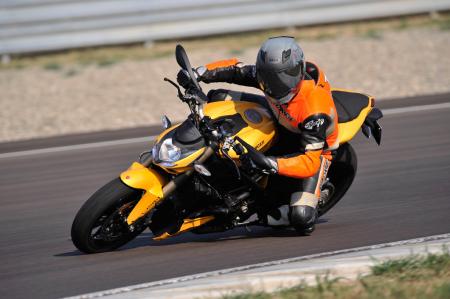
hp and 89 ft.-lb. of torque at 9500 rpm, the new Fighter is powered by an 848cc Twin outputing a claimed 132 hp and 69 ft.-lb. of torque at 10,000 and 9500 rpm, respectively. Producing its peak horsepower 500 rpm higher in the rev range and with a compression ratio of 13.2:1, compared to the S’s 12.5:1, the new SF is a little more high-strung than the larger-displacement model.
The new 2012 848 Streetfighter doesn’t breathe as much fire as the original 1098 model, but it’ll still burn anyone who foolishly disrespects the smaller Fighter. |
Ducati’s crankshaft-derived power figures will decrease when run on a rear-wheel dyno. The 848 Superbike is factory-rated at 140 hp, 8 up from the new Streetfighter due to slightly less valve lift and duration, and it produced 119 hp on the Superflow dyno at Mickey Cohen Motorsports during our middleweight sportbike shootout. Thus, we expect the 848 SF to generate a little over 110 ponies at the rear wheel.
This amount of power is plenty fun and exciting on a bike weighing approximately 410 pounds full of fluids. On the street there’s enough oomph for any situation, whether it be wheelieing or passing, while on the track the 848 Fighter will make easy work of better bikes with lesser riders.
Set to retail at $13,000, the 848 Streetfighter is substantially more affordable than the $19,000 Streetfighter S but only $2000 less than the soon to be nonexistent $15,000 standard Streetfighter (hurry and get yours now if you perceive the standard 2011 1098 Streetfighter a better value). The 848 does retain Ducati Traction Control, which is a commendable technology to be included at such a low MSRP.
The bigger Streetfighter S model, in addition to the increased power of the larger engine, boasts an Ohlins fork whereas the 848’s front legs are of the Marzocchi variety. Both suspension components are fully adjustable and measure 43mm in diameter. The 848’s front end, however, is steeper than the S with 24.5 degrees of rake compared to 25.6 degrees on the S model. The 848 also has less trail than the S, 103mm vs 114mm, respectively, but the wheelbase of both bikes remains identical at 58.1 inches.
 |
| Top Ducati 848 Streetfighter Review - First Ride |
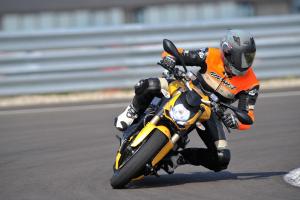
New rake and trail figures do little to cure the Streetfighter’s front-end nervousness.
Whether on the street or the track the Streetfighter takes some time for the bike to feel comfortable and/or familiar. The front end on the 848 version as well as the 1099cc original can feel a bit twitchy, especially when leaned into a corner, and trail braking doesn’t come naturally when riding the Streetfighter. With the 848 spanning the same distance between contact patches as the S model but with a steeper rake and less trail suggests that Ducati may still be searching for a better base setup — which if achieved would go a long way in making the bike more inviting — but neither measurement lends itself to improved confidence. Usually less rake and more trail would help calm down a nervous front end, so Ducati’s unconventional approach of more rake and less trail to apply calm is interesting. Without a 1098 Streetfighter to ride for comparative purposes at the event, it’s hard to say if the change in front end measurements are better or worse, with the issue still persisting, though, it’s definitely not solved.
It wasn’t until the second session on the track that I was riding comfortably fast, pushing the Streetfighter closer to the edge of its performance envelope. The front end’s nervousness and higher handlebars dictate a light touch — ham-fistedness results in a wondering front wheel.
 |
| Top Ducati 848 Streetfighter Review - First Ride |
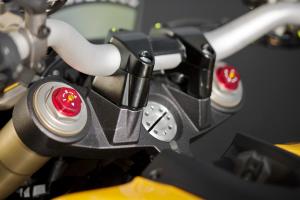
Twenty millimeter higher handlebars provide a less aggressive but more civil riding position.
Other significant differences of the 848 SF include a wet rather than dry clutch and new 10-spoke wheels instead of the five-spokers on the S. The tapered aluminum handlebars of the 848 are also 20mm higher than those of the S model. The high seat height of the S, 33 inches, carries over to the new 848, as do the slippery footpegs. The majority of these changes comprise to make the new 848 Streetfighter a better companion to the motorcyclist who is more concerned with the competency of the Streetfighter as a usable streetbike and less about the upgraded performance of the S model.
The higher handlebars, for instance, relieve some of the pressure on a rider’s wrists allowing for more time spent in the saddle. Because Ducati didn’t go as far as to change the seating position itself, this extra leverage is oftentimes put to use maintaining a comfortable distance between fuel tank and crotch. The combination of a very narrow tank/seat junction and downward sloping seat can make bumpy road riding a testicle-harrowing experience.
Light weight, wide bars and a narrow mid-section make the 848 Streetfighter easy to transition from side to side. |
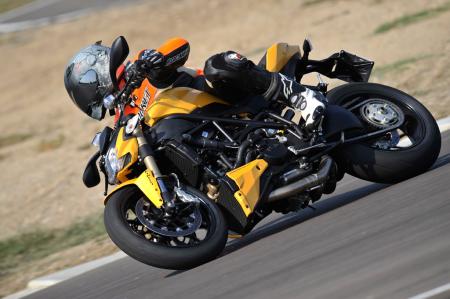
On a smooth, closed course racetrack such as the brand new Autodromo Modena (the 848 Streetfighter press intro was the track’s first official function) the narrow seat/tank juncture allows for quick, side-to-side transitioning.
Complaints were made of the original Streetfighter that a rider’s right ankle was forced uncomfortably away from the bike due to an exhaust heat guard. Ducati addressed this on the 2012 848 SF by adding a 10mm spacer to the right footpeg. Yes, the ankle no longer feels at an odd angle, but the modification did take away a degree of lean angle on a bike that has riders touching toe sliders to tarmac in concert with placing a knee on the ground.
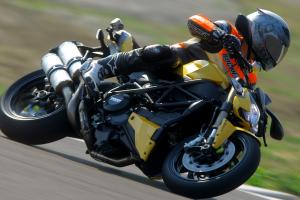
The twin front, radially-mounted Brembo brakes and 320mm discs provide good braking power and didn’t fade during our two track sessions, but feel at the adjustable lever is a little vague.
 |
| Top Ducati 848 Streetfighter Review - First Ride |
Top components such as Brembo brakes and Ducati Tracton Control increase the value of the $13,000 848 Fighter.
At the rear of the bike a fully adjustable Sachs shock attaches to a cast aluminum single-sided swingarm. The 5.5-inch rim holds a new 180/60 ZR17 Pirelli Diablo Corsa tire. The new size tire provides a wider contact area over its radius, and Pirelli claims improved damping capabilities to provide a smoother ride. Boasting a World Superbike compound on the right and left sides, the tire’s traction was never in question. The 848 Streetfighter will be available in Fighter Yellow, Ducati Red and Dark Stealth but in any color the bike remains a stunner. The aggressive sex appeal of this motorcycle is undeniable, and if you can manage its few foibles, the 848 Streetfighter should make for a wonderful companion.
With the exception of the uncomfortable tank/seat juncture, the seating position provides plenty of leg room and a respectable distance from seat to footpegs. The higher handlebars will help keep the weight of a passenger off the rider’s back and the increased distance of the footpeg alleviates discomfort of the rider’s right foot.
Unskilled riders on faster bikes will see a lot of this angle of the 848 Streetfighter. |
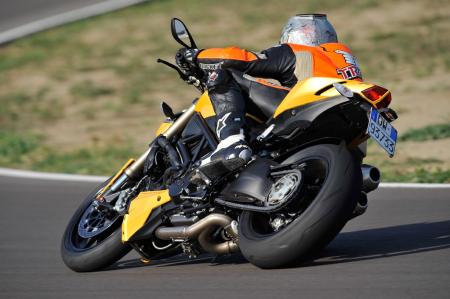
I personally wouldn’t want to spend more than an afternoon on the Streetfighter, but for a motorcyclist looking for competent weekend carver and occasional track day tool the Streetfighter is all that in an attention-getting package.
Friday, February 20, 2015
Mini Cooper Paceman First Look
Mini Cooper Paceman First Look When we first laid eyes on the Mini Paceman concept -- essentially the coupe version of the Countryman four-door -- at the 2011 Detroit auto show, we wondered, is it a niche too far? How many more ways can Mini slice and dice its lineup? Apparently, Mini believes theres a group of customers out there who want a car with the same driving attitude as the base Mini hardtop coupe, but wrapped in a bigger, more useful package.


.jpg)


.jpg)


Mini Cooper Paceman First Look
 |
| Mini Cooper Paceman First Look |
Mini Cooper Paceman First Look
.jpg) |
| Mini Cooper Paceman First Look |
Mini Cooper Paceman First Look
For those folks, the Mini Cooper Paceman is on the way to U.S. shores in short order after its debut in production trim at the 2012 Paris auto show. Its the brands seventh model, and according to Mini PR chief Andreas Lampka, it was always in the cards. Its also the second Mini available with the brands All4 all-wheel-drive system. Mini Cooper Paceman Headlight Minis trademark bulldog stance, with massive headlights, strong shoulders, and short overhangs, is predictably a big part of the Pacemans look. Its side profile, however, is where youll notice its transformation from four doors to two. Everything from the A-pillar back is all new and specific to the model. The roof has a 4-degree slope that ends at a standard-issue spoiler. A sharp character line on each door leads into the 17-wheels (18- and 19-inchers are optional) to emphasize the cars length. And for the first time on a Mini, designers have implemented horizontal LED taillamps and an XL-size badge to accentuate its width.
Despite all the visual length and width tricks, dimensionally the Paceman is nearly identical to its Countryman sibling. Overall length is the same at 161.7 inches, while width is down by 0.1 inch to 70.4. The height has been shortened by 1.7 inches to 59.7. Not surprisingly, its some 44 pounds lighter than a similarly equipped Countryman. It also sits 0.4 inches closer to the ground. Mini Cooper Paceman Rear Cabin Space Cabin dimensions havent been disclosed, but Lampka insists the only major differences are at the rear, where rear headroom is cut by 0.4 inches and cargo capacity drops to 15.8 cu-ft. During our recent prototype drive in Malaga, Spain, headroom wasnt a problem. We couldnt tell you about cargo room, though it did look tight back there. Mini Cooper Paceman Seats Down Much like the exterior, the Pacemans interior includes a few significant departures from the Mini norm. It seems engineers listened to the flood of consumer (and auto journalist) complaints and moved the Pacemans center dash mirror adjustments, window switches, and door-lock buttons to where they should be: on the doors. All other dashboard and center console details are similar to those in the Countryman. Matte Carbon Black, high-gloss black, or optional chrome plastic surround the vents, dash, and lower center console. The requisite variable colored lighting, Mini Connected system, navigation, and harman/kardon stereo are options, while standard features like the Center Rail system (in one- or two-piece forms) remain. Diagonal track cloth arrives with the base asking price, and a variety of leather options can be specified
Nothing has changed under the hood. The Paceman gets Minis familiar 1.6-liter four-cylinder for the base and S editions, with the same 121- or 181-horse output depending on trim. Torque remains at 114 lb-ft for the base model, while the twin-scroll turbocharged S touts 177 lb-ft of pull (192 lb-ft in overboost). Each engine has a Getrag six-speed manual or Aisin six-speed auto attached. Paddles come standard in S models, optional on all others; same goes for the Sport button. Mini Cooper Paceman Front Three Quarters A Countryman variant isnt a Countryman variant without ALL4 all-wheel drive, so engineers made sure to make it available on the S model. ALL4 can send up to 50 percent of the power to the rear wheels, and in extreme low-grip situations, that can be upped to 100 percent. Minis full barrage of drive-safe nanny technologies - Dynamic Stability Control, ABS, Electronic Brake Force Distribution, Brake Assist and Hill Assist - comes standard, as does a plethora of airbags. During our prototype drive we were surprised at how well the Paceman carried its relatively hefty mass around Malagas tight bends. Its not as nimble as the base Mini, and the car we drove had an emissions testing calibration that restricted its performance, but the Paceman still invigorated the senses and enticed a smile. That bodes well for this seventh edition, but until we take delivery of one at MT HQ, well have to wait and see if this niche-filler does indeed fill the mini-est of voids.
Despite all the visual length and width tricks, dimensionally the Paceman is nearly identical to its Countryman sibling. Overall length is the same at 161.7 inches, while width is down by 0.1 inch to 70.4. The height has been shortened by 1.7 inches to 59.7. Not surprisingly, its some 44 pounds lighter than a similarly equipped Countryman. It also sits 0.4 inches closer to the ground. Mini Cooper Paceman Rear Cabin Space Cabin dimensions havent been disclosed, but Lampka insists the only major differences are at the rear, where rear headroom is cut by 0.4 inches and cargo capacity drops to 15.8 cu-ft. During our recent prototype drive in Malaga, Spain, headroom wasnt a problem. We couldnt tell you about cargo room, though it did look tight back there. Mini Cooper Paceman Seats Down Much like the exterior, the Pacemans interior includes a few significant departures from the Mini norm. It seems engineers listened to the flood of consumer (and auto journalist) complaints and moved the Pacemans center dash mirror adjustments, window switches, and door-lock buttons to where they should be: on the doors. All other dashboard and center console details are similar to those in the Countryman. Matte Carbon Black, high-gloss black, or optional chrome plastic surround the vents, dash, and lower center console. The requisite variable colored lighting, Mini Connected system, navigation, and harman/kardon stereo are options, while standard features like the Center Rail system (in one- or two-piece forms) remain. Diagonal track cloth arrives with the base asking price, and a variety of leather options can be specified
Nothing has changed under the hood. The Paceman gets Minis familiar 1.6-liter four-cylinder for the base and S editions, with the same 121- or 181-horse output depending on trim. Torque remains at 114 lb-ft for the base model, while the twin-scroll turbocharged S touts 177 lb-ft of pull (192 lb-ft in overboost). Each engine has a Getrag six-speed manual or Aisin six-speed auto attached. Paddles come standard in S models, optional on all others; same goes for the Sport button. Mini Cooper Paceman Front Three Quarters A Countryman variant isnt a Countryman variant without ALL4 all-wheel drive, so engineers made sure to make it available on the S model. ALL4 can send up to 50 percent of the power to the rear wheels, and in extreme low-grip situations, that can be upped to 100 percent. Minis full barrage of drive-safe nanny technologies - Dynamic Stability Control, ABS, Electronic Brake Force Distribution, Brake Assist and Hill Assist - comes standard, as does a plethora of airbags. During our prototype drive we were surprised at how well the Paceman carried its relatively hefty mass around Malagas tight bends. Its not as nimble as the base Mini, and the car we drove had an emissions testing calibration that restricted its performance, but the Paceman still invigorated the senses and enticed a smile. That bodes well for this seventh edition, but until we take delivery of one at MT HQ, well have to wait and see if this niche-filler does indeed fill the mini-est of voids.
Subscribe to:
Posts (Atom)